How to evaluate Enterprise Identity Orchestration Tools

Activate Chief Technology Officer, Robbie Burke
Choosing identity orchestration tools is not simply about finding software that can provision accounts or connect to applications. For enterprise architects and IAM leaders, the more important question is whether a platform can coordinate identity changes across existing systems, approvals, policies and operational teams.
This guide explains what to evaluate, where enterprise complexity matters and which questions to ask vendors before selecting an identity orchestration solution.
Who needs identity orchestration software?
Most large organisations are not short of identity tools. They likely already have Active Directory, Microsoft Entra ID, enterprise SSO, access governance, an ITSM platform and several hundred business applications.
On paper, the stack looks pretty complete but in practice, people are still raising tickets, chasing approvals and manually moving identity information between systems. Again and again, we’ve seen that identity and access are an oversight that is only corrected once the scale of the oversight becomes clear. That is the problem identity orchestration software platforms like Activate are intended to solve.
So what is it?
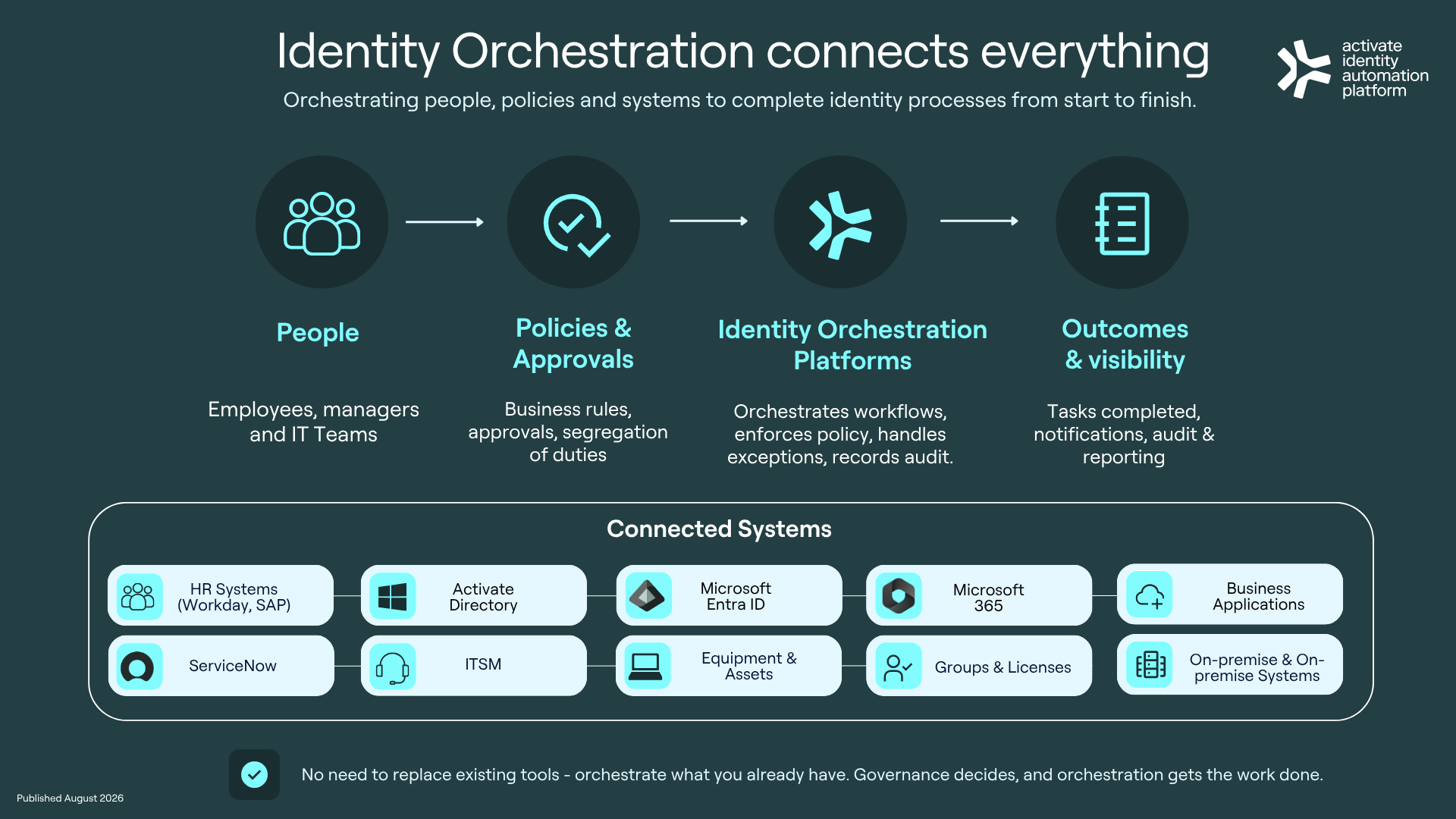
Identity orchestration software coordinates identity processes across the systems an organisation already uses. It connects the people, policies, approvals and technical tasks required to complete an identity process from start to finish. For example, onboarding one employee might involve:
Confirming information from the HR system
Creating Active Directory and Microsoft Entra accounts
Assigning licences and security groups
Provisioning business applications
Requesting equipment
Completing manager and application-owner approvals
Updating ServiceNow
Recording what happened for audit purposes
Automating one of those tasks is useful - making the whole process run correctly, in the right order and under the right policies is orchestration.
Identity management is only part of the job
Identity management platforms are good at maintaining identity records, authenticating users and controlling access. Access governance tools help organisations decide who should have access and whether they should keep it. Enterprise SSO makes it easier for people to sign in. All of these capabilities matter- but none of them necessarily completes the operational work that sits between a request and a finished outcome. Someone still has to collect the request, apply the relevant policy, find the correct approver, provision access across each system, handle exceptions, update the service ticket, notify the right people - and, keep a record of every step.
Identity orchestration software brings those activities together. It does not need to replace your existing identity investments. A good platform should make them work together more effectively.
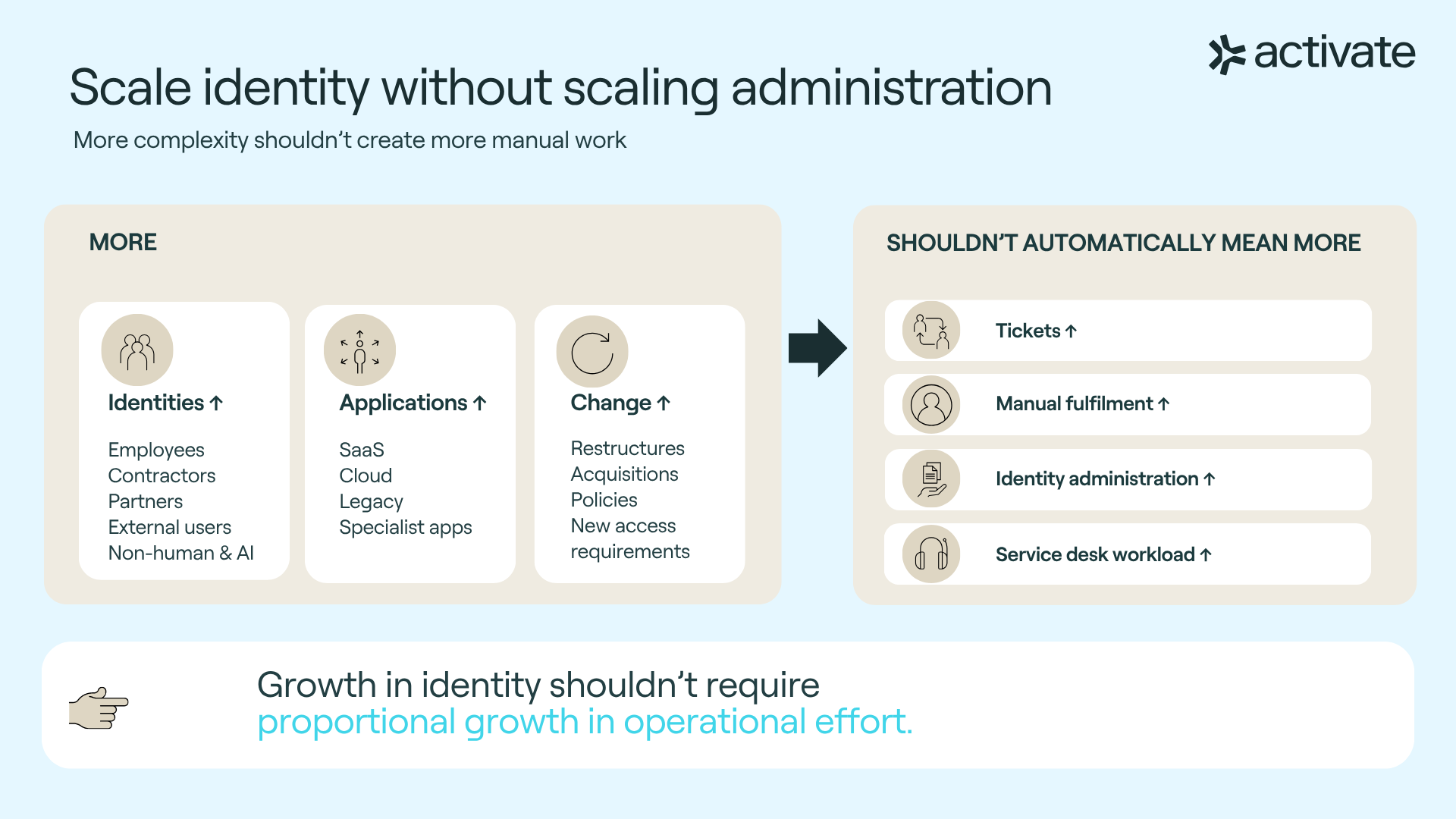
Identity orchestration software helps you scale identity without scaling the administration burden
More employees, applications and change shouldn’t automatically mean more tickets, manual fulfilment, identity administration or service desk workload.
So what should you look for?
Feature lists can make identity platforms look remarkably similar. The more useful question is whether the software can handle the way identity work actually happens inside your organisation.
1. A platform that works with the systems you already have
Most enterprises are not starting again. Their environment may include a mix of:
Microsoft Entra ID
Active Directory
ServiceNow
Workday
SAP
Okta
SailPoint
Microsoft 365
On-premises applications
Custom business systems
Identity orchestration software should connect these systems without requiring the organisation to replace everything else first. This is particularly important in hybrid environments, where critical identity processes still span cloud and on-premises infrastructure. A cloud-only diagram may look tidy, but enterprise environments generally are not.
2. A platform that automates complete workflows
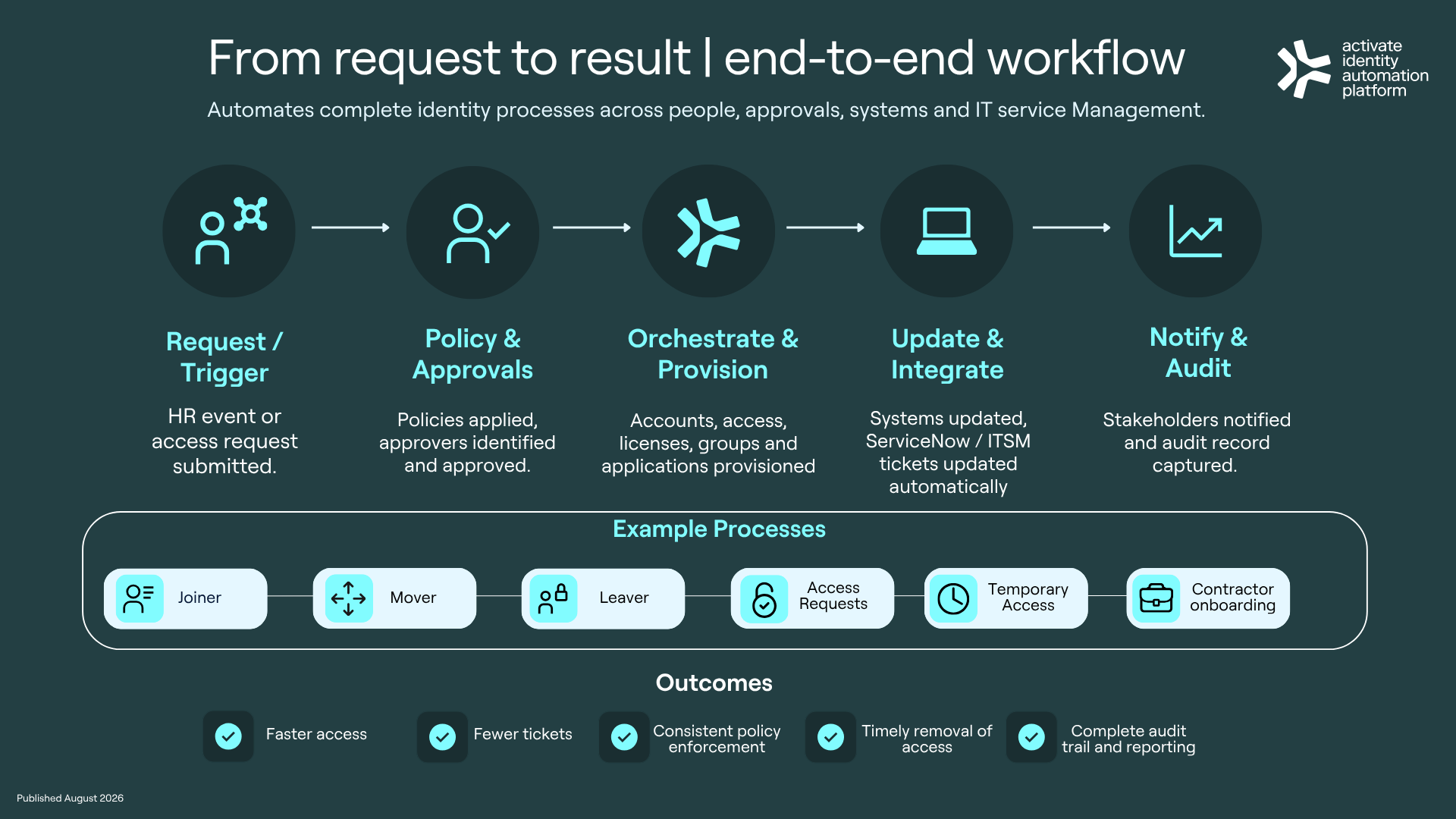
Creating an account is not the same as onboarding an employee. Disabling a login is not the same as completing an offboarding process. Look for a platform that can manage complete automation workflows, including:
Joiner, Mover and Leaver processes
Access requests
Temporary and time-bound access
Contractor onboarding
Department and role changes
Application provisioning
Licence assignment and recovery
Equipment and asset workflows
Approvals and notifications
Exceptions and manual intervention
The aim is not to automate the easy 20% and leave the service desk to tidy up the rest.
3. Policy enforcement built into the process
Identity automation should not mean removing control. Identity orchestration software should apply the correct policy every time a workflow runs. That may include:
Role-based access rules
Segregation of duties
Manager or application-owner approvals
Time limits
Business-unit requirements
Conditional access pathways
Additional checks for sensitive systems
Policies should be part of the workflow, not a document someone is expected to remember.
4. A platform that complements access governance
Access governance and identity orchestration solve different parts of the problem. Access governance helps determine who should have access. Identity orchestration carries out that decision across the relevant systems and records the result. The two should work together.
For example, a governance platform may identify that an employee no longer needs access to an application. The orchestration platform can then remove the access, update connected systems, close any related tasks and record the evidence. Governance makes the decision. Orchestration gets the work done.
5. A platform that handles enterprise complexity
Basic workflows are easy to demonstrate. Real ones contain parallel tasks, dependencies, exceptions, failed connections and approvals that sit unanswered for three days because someone is on leave. Enterprise identity orchestration software should be able to manage:
Conditional logic
Multi-stage approvals
Parallel provisioning tasks
Retry and failure handling
Escalations
Human intervention
Customer-specific business rules
Different processes for different teams or locations
Ask vendors to show you what happens when a process does not go perfectly - that’s usually where the useful part of the demonstration starts.
6. A platform that provides digital workplace visibility
Identity work often crosses HR, IT, security, service management and business teams. Without a shared view, it can be difficult to tell:
Which tasks are complete
Which approvals are outstanding
Where a workflow has failed
Whether service targets are being met
What access was ultimately provided
Who approved it
How much manual work remains
Digital workplace visibility should include real-time workflow status, operational dashboards, audit records and reporting across connected systems. This gives service teams a clearer picture of what is happening without opening several tools and comparing notes.
Questions to ask identity orchestration vendors
A useful evaluation should go beyond asking whether a platform has a connector for a particular application. Ask vendors:
Can your platform orchestrate processes across cloud and on-premises systems?
Does it work with our existing identity management and access governance tools?
Can it automate an entire Joiner, Mover and Leaver process?
How are policy enforcement rules applied?
Can workflows include approvals, fulfilment tasks and notifications?
What happens when a connected system is unavailable?
How are exceptions and manual steps handled?
Can it update ServiceNow or another ITSM platform as work is completed?
How much digital workplace visibility do operational teams receive?
Can the platform support our business-specific rules without extensive custom development?
How long does it take to add a new application or workflow?
What evidence is retained for audit and compliance?
It is also worth asking vendors to demonstrate one of your real processes - a tidy generic onboarding demonstration will only tell you so much.
Why identity orchestration matters in 2026
Identity environments are becoming more complex. Organisations are managing employees, contractors, service accounts, machines and a growing number of AI assistants and agents. These identities all depend on the same operational foundations: clear policies, reliable approvals, correct provisioning and timely removal of access.
AI does not fix a weak identity process, it usually finds it faster. Strong identity operations give organisations a more reliable base for automation and AI adoption. Identity orchestration helps by making sure identity changes are completed consistently across every connected system.
Choosing the right platform
The best identity orchestration software is not necessarily the platform with the longest feature list - it’s the one that can operate across your real environment, enforce your policies and complete your identity processes with less manual effort. Look for a platform that:
Works with your current technology
Supports hybrid identity environments
Automates complete workflows
Connects governance decisions with operational action
Provides clear visibility and audit evidence
Can adapt to the way your organisation works
Most enterprises already have the tools required to manage identities. The missing piece is often the operational layer that brings them together.
How Activate’s Identity Automation Platform supports enterprise identity operations
Activate orchestrates identity operations across HR systems, Active Directory, Microsoft Entra ID, ServiceNow and business applications. It works alongside your existing identity management and access governance platforms to automate complete processes, including:
Joiner, Mover and Leaver workflows
Access requests and approvals
Account and application provisioning
License and group management
Policy enforcement
ServiceNow fulfilment
Audit records and operational reporting
The result is less ticket-led identity work, faster access and a clearer view of what is happening across the digital workplace.
- Robbie
Discover the platform
Discover Activate’s Identity Operations Solution
Follow me Robert Burke and Activate on LinkedIn for more practical insights on governed automation, enterprise AI and identity-driven workflows.